Can a QR Code Be Any Color? Which Colors Work and Which Break Scanning
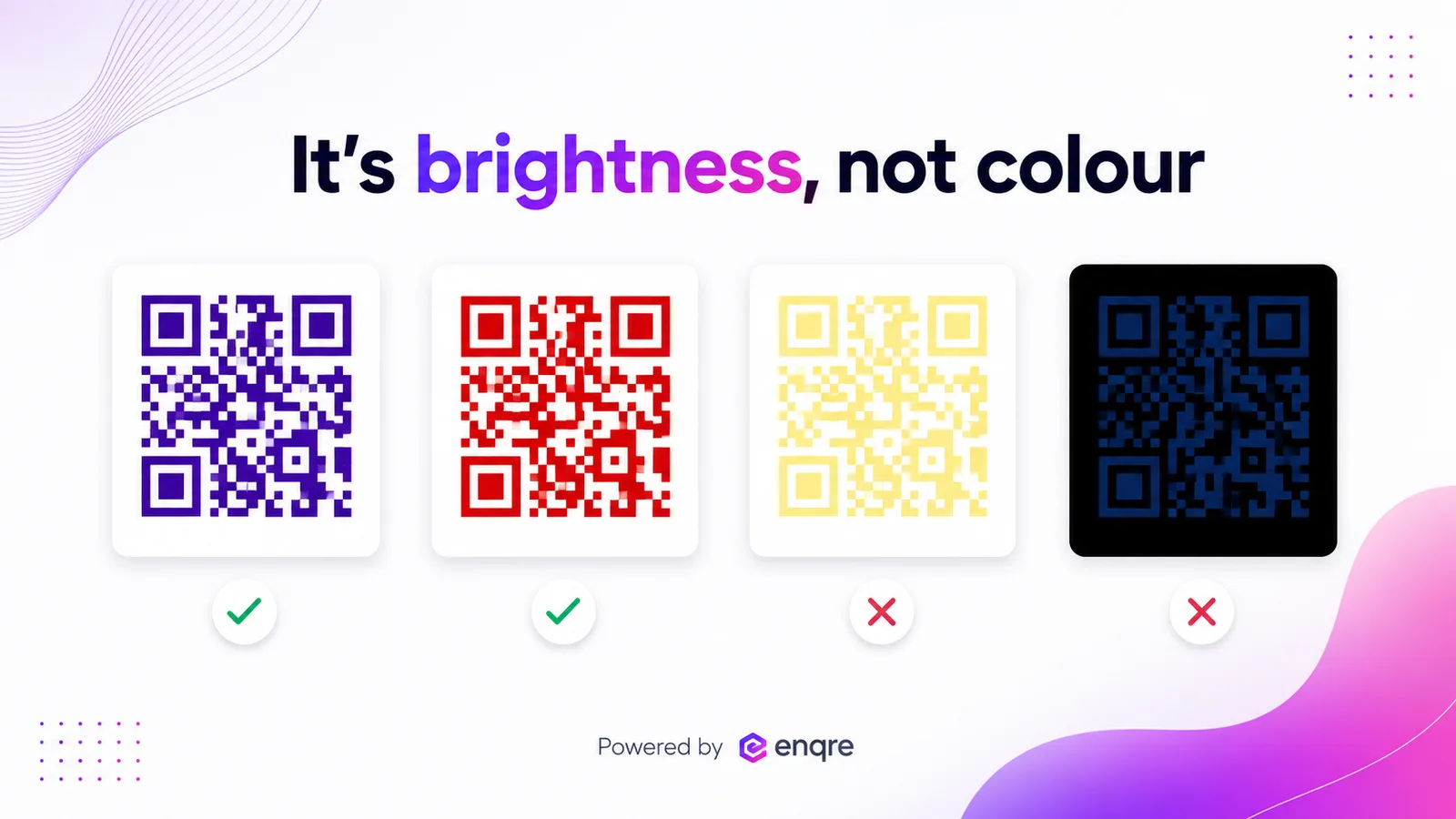
Yes — a QR code can be almost any color, on one condition: the pattern and its background must differ enough in brightness (luminance), not just in hue. Dark modules on a light background is the safe default. Combinations that look colorful to you but similar in brightness to a camera — yellow on white, red on black, two mid-tones — quietly stop scanning.
The one rule: contrast by brightness, not color
A scanner does not see your brand palette; it sees light and dark. It converts the image to brightness and looks for a clear step between the modules and the background. Two colors that look obviously different to your eye can carry almost the same brightness to a camera — and then the code is, to the scanner, a grey square. So the question is never "is this color allowed"; it is "is there enough brightness difference between the marks and the space behind them".
The safe default is dark modules on a light background: a deep, saturated color for the pattern and white or a very pale tint behind it.
Can a QR code be inverted (light on dark)?
Often, yes — most modern phone cameras read a light pattern on a dark background if the contrast is high. But it is less universally reliable than dark-on-light: some older or industrial scanners still assume dark modules. If you invert, keep the contrast extreme (near-white on near-black), keep the quiet-zone margin, and test on a cheap phone before you print.
The parts that fail first
- The three corner squares (finder patterns). A scanner locates these before it reads anything else, so low contrast there fails earlier than anywhere in the body. Never tint the finders lighter than the rest.
- The pale end of a gradient. A gradient that fades toward a light color breaks where it goes pale — and the on-screen preview still looks fine, so it ships and then fails in the field. Keep both ends dark enough.
- The quiet zone. The blank margin around the code is part of the code. A colored or photographic background that bleeds into that margin removes the contrast the scanner needs to find the pattern at all.
Color combinations that break scanning
- Light modules on white — yellow, pale pastels, light grey: almost no brightness step.
- Dark modules on a dark background — navy on black, dark green on charcoal.
- Two mid-tones — e.g., a medium red on a medium green: colorful, but similar brightness.
- A busy photo behind the code — the background brightness varies under the modules, so parts of the pattern vanish.
Red, deep blue, purple and dark green usually work well as the module color on white, because they are genuinely darker than the background. The trap is brightness, not the specific hue.
How to keep it colorful and scannable
Pick a dark, saturated brand color for the modules, keep the background light, keep the finders the darkest part, and keep the quiet zone clean. If you use a gradient, keep the light end well above pale. Then check it before committing to a print run — Enqre's contrast checker reads the design the way a camera does (by luminance) and flags the finders, the gradient ends and a centre logo against the error-correction level. A logo, in particular, removes modules, so pair it with a high error-correction level — more in QR code design with a logo.
Frequently asked questions
Can a QR code be white?
Only inverted: white modules on a dark background, with high contrast and a clean margin — and test it, because not every scanner reads inverted codes. White modules on a light background will not scan.
Can a QR code be red?
Usually yes, on white — red is genuinely darker than white, so the brightness step is there. Red on black, however, fails: both are dark.
Does a colored QR code scan less reliably than a black one?
Not if the brightness contrast is high. Pure black on white is the maximum; a dark color on white is close behind. Reliability drops only as the contrast drops.
Can I put a photo behind the QR code?
It is risky. A photo changes brightness under the modules and in the quiet zone. If you must, place the code on a solid light panel over the photo, not directly on the image.
Can I use a gradient?
Yes, if the lightest point of the gradient is still clearly darker than the background. The failure is always at the pale end, which the preview hides — so check it.
Colour is rarely what breaks a code. Contrast is, and on a bright monitor the two are almost impossible to tell apart — which is why this fails in print and not in the design review. Read the ratio instead of trusting your eyes, and above that number you can do very much as you like. The designer shows it as you pick.
The Enqre Team·Published on 8/10/2026·Updated 9/17/2026