Published on 8/5/2026
One QR Code for App Store and Google Play
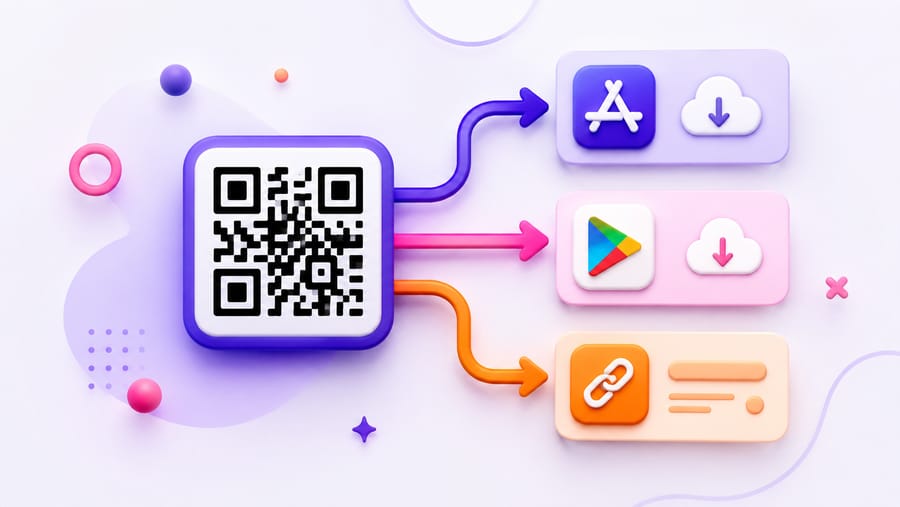
Printing two codes labelled "iPhone" and "Android" is the version of this that everyone has seen and nobody likes. It doubles the space, halves the size of each code, and asks a passer-by to know which square is theirs.
One code that decides for them is better, and the mechanism is simple enough to explain in a sentence: the scan arrives, the operating system is read from the request, and the visitor is redirected to the store that matches.
Exactly how the routing behaves
Worth knowing precisely, because the edge cases are where campaigns break:
- iPhone and iPad → your App Store link.
- Android → your Google Play link.
- macOS → also the App Store link. A Mac is treated as Apple, which is usually what you want; if you have a separate Mac build, that is worth knowing about in advance.
- Windows, Linux, anything unrecognised → the fallback link.
- A field left empty falls through: no iOS link means an iPhone gets the fallback, and no fallback means it gets the Android link rather than an error.
That last rule is a safety net, not a plan. An iPhone landing on a Play Store page is a dead end, and it happens exactly when someone filled in one store and left the rest blank.
Fill in the fallback
This is the one instruction in this article that costs money to ignore. The fallback is what a desktop visitor gets — and desktop visitors are common, because posters get photographed, links get shared into Slack, and QR codes end up in slide decks.
Point the fallback at a landing page with both store badges and a short description. Not your homepage: someone who scanned a code about an app should not have to find the app on your site.
The fallback also covers the case where detection is simply wrong — a phone in desktop mode, an unusual browser, an in-app webview with a rewritten user agent. Detection is based on what the request says about itself, and requests occasionally lie.
What to point the store links at
- The app's store listing, not a search result and not your website's download page. Every extra tap between the scan and the install button loses people.
- The right regional behaviour. Store links resolve to the visitor's country store on their own; do not hard-code a country path unless you mean to exclude everyone else.
- Campaign parameters if you use them. Both stores accept their own attribution parameters on the listing URL, and the code passes the URL through as you entered it.
One thing this does not do: deferred deep linking. The code takes a visitor to the store; it does not carry "open this specific screen after install" through the installation. If your campaign depends on landing users inside a particular part of the app after they install, you need an attribution SDK, and this code should point at whatever link that vendor gives you.
Why dynamic matters here more than usual
App links change more often than the print they are on. A rebrand, a new bundle identifier, a second app that replaces the first, a launch on the other platform three months later — all of that changes the destination while the poster stays on the wall.
With a dynamic code you edit the two links and the printed material follows. And the common case: you print before the Android build ships, so on day one both platforms point at the App Store and the fallback explains that Android is coming. On launch day you paste in the Play link, and the same posters start routing correctly.
What the numbers will tell you
The operating-system breakdown is genuinely useful here, because it is the platform split of the people who saw your poster — not of your existing users, which is the number you already have and which is biased by whatever you launched on first.
You also get scans over time, device type, browser, referrer and unique visitors from a hashed IP. What you do not get is location — there is no geolocation in the analytics at all — so if you want to compare the poster at the station with the one in the office, give each its own code. Same for a flyer versus a conference banner.
And a limit worth stating: this counts scans, not installs. Installs live in App Store Connect and the Play Console. Comparing the two tells you the drop-off between the store page and the install button, which is the more interesting number anyway.
Print notes for app posters specifically
- Size for the distance. Roughly a tenth of the reading distance: about 3 cm on a flyer, 10 cm on a poster read at a metre, 20–30 cm on something read across a room.
- Do not put the code on a screen. An app-download code in an email or on your website is asking a phone user to scan their own screen. Link the store badges instead.
- Say what the app is next to the code. "Scan to download" is not a reason. The reason belongs in the line above it.
Quick answers
- Can one QR code serve both app stores? Yes — the app-store code routes by the phone's operating system.
- What does a laptop get? The fallback link. Leave it empty and desktop visitors get whichever store link you filled in.
- What does a Mac get? The App Store link; macOS is routed as Apple.
- Where should the fallback point? A landing page with both store badges — not your homepage.
- Does it support deferred deep linking? No. It goes to the store. Use an attribution provider's link if you need post-install routing.
- Can I see installs? No, only scans. Installs come from App Store Connect and the Play Console.
- Can I change the links after printing? Yes, that is the point of a dynamic code — useful when the second platform launches later.