Published on 8/11/2026
Why Does My QR Code Show Garbled Text? (UTF-8 Explained)
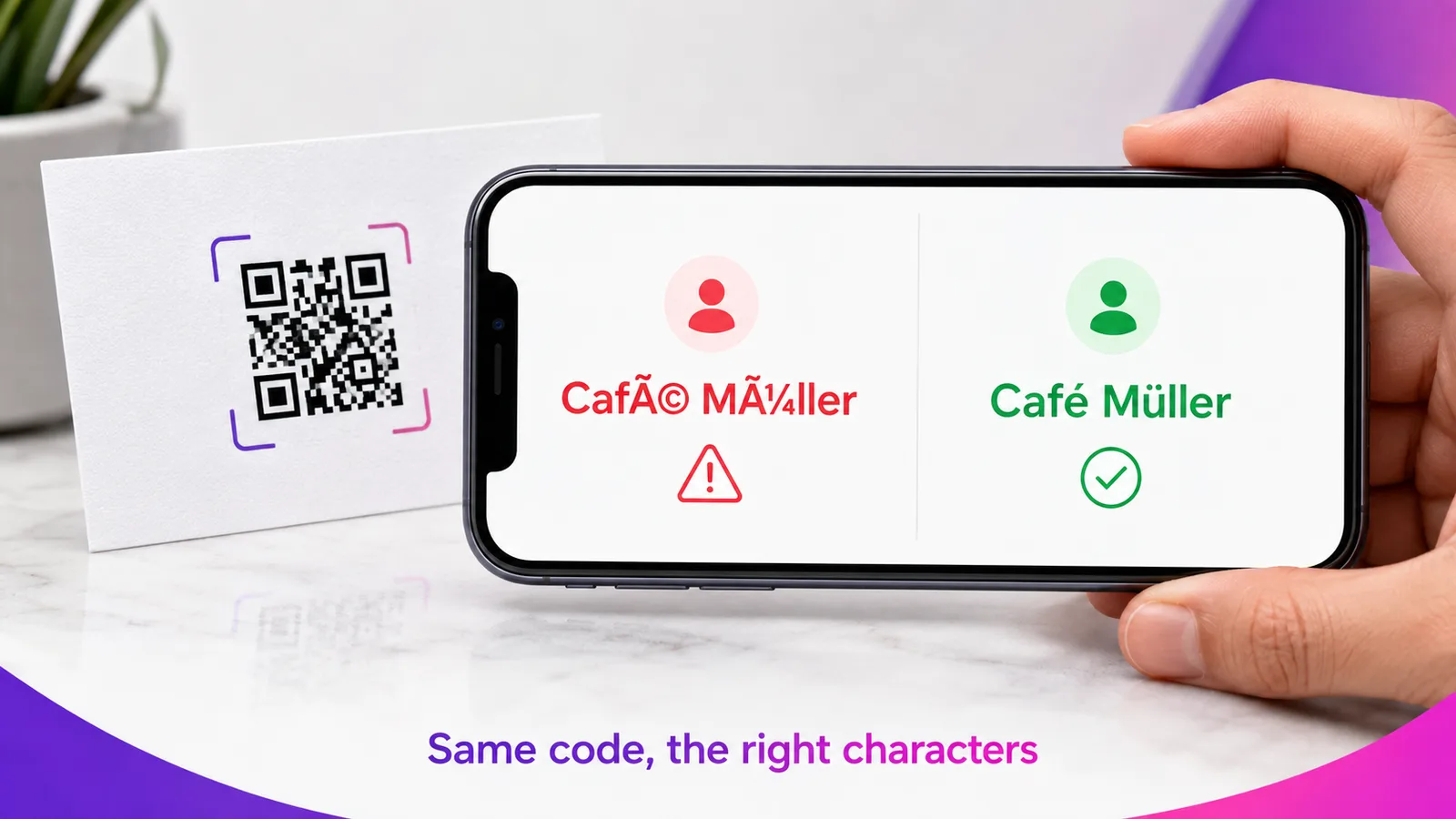
Garbled characters in a QR result — Café instead of Café, Müller instead of Müller, boxes or question marks instead of Cyrillic — almost always come down to one thing: a character-encoding mismatch. The code was built with the wrong text encoding, so the phone decodes accented or non-Latin letters incorrectly. The fix is to generate it in UTF-8 from the start.
What the garble looks like
The symptoms are easy to recognise once you have seen them:
- Extra "Ã" characters:
CafébecomesCafé,MüllerbecomesMüller,SeñorbecomesSeñor. - Boxes or question marks:
мойor北京come out as���,□□□or???. - Missing emoji: an emoji vanishes or turns into a box.
Plain ASCII text — a–z, 0–9, basic punctuation — is never affected. The problem only touches accented letters (é, ü, ñ, ç, å), non-Latin scripts (Cyrillic, Greek, Arabic, Chinese) and emoji.
The real cause: how a QR code stores text
A QR code does not store letters; it stores bytes. To turn the word "Café" into bytes, the generator has to pick a character encoding — a table that maps letters to numbers. The modern standard is UTF-8, and it is what phone cameras expect.
Trouble starts when a generator uses an older, single-byte encoding instead — ISO-8859-1 (Latin-1) or Windows-1252 — or produces UTF-8 without signalling it. UTF-8 writes "é" as two bytes; Latin-1 writes it as one. When the bytes written by one encoding are read back with another, the phone reconstructs the wrong character, and you get Café. It looks like a phone bug, but the mismatch was baked into the code when it was generated.
Where it bites most
Anywhere a QR code carries text directly, rather than just a link:
- WiFi codes with an accented network name or password — the phone tries to join "Café-Guest" and fails, or shows the wrong name.
- vCard contact codes where the name has an accent — José, Müller, or any Cyrillic name saves wrong.
- Plain-text and note codes in any non-English language.
- URLs with non-ASCII characters that were not percent-encoded.
How to fix it
Use a generator that encodes in UTF-8. That single choice resolves every case above. Our free tools do this deliberately — the underlying library defaults to Latin-1, so we switch it to UTF-8 for exactly this reason:
- The WiFi QR code generator handles accented and non-Latin network names correctly.
- The vCard QR code generator preserves José, Müller and Cyrillic names.
If you generate codes in your own software, force UTF-8 byte mode. For maximum compatibility with older readers, some codes also add an ECI marker that declares the character set to the scanner — support for it is uneven, so the dependable path is to encode UTF-8 and test on a real phone.
Check before you print
The surest test is to scan your own code and read what it says. Upload it to the free QR code scan checker: it decodes the image and shows the exact text the code contains, so you see "Café" or "Café" before it ever reaches a customer. If it is garbled there, regenerate in UTF-8 — a printed code cannot be fixed after the fact.
Frequently asked questions
Why does my WiFi QR code show the network name wrong?
The network name or password contains an accented or non-Latin character, and the code was built in Latin-1 instead of UTF-8. Rebuild it with a UTF-8 generator and the name comes through correctly.
Why does my contact QR spell my name wrong?
Same cause: a vCard with an accented or Cyrillic name encoded in the wrong charset. A UTF-8 vCard generator fixes it.
Does the QR code itself record the language or charset?
Not by default. In byte mode a QR stores raw bytes with no charset attached, and readers assume UTF-8. A code can include an ECI marker to declare the charset explicitly, but not every reader honours it — which is why encoding UTF-8 and testing is the safe combination.
Can I fix a QR code that is already printed?
No. The bytes are fixed in the printed pattern, so a garbled WiFi or vCard code must be regenerated in UTF-8 and reprinted. A dynamic redirect code is different — you can change its destination — but the garble here lives in embedded data, not a link.
Do emojis work in QR codes?
Yes, as long as the code is UTF-8 — emoji are multi-byte UTF-8 characters. A Latin-1 generator cannot represent them at all. Emoji also make the code denser, so keep the rest of the content short.
Make a code that gets the characters right the first time — try the free WiFi and vCard generators, or create a dynamic code with your logo and analytics.